






Boost ITSM Efficiency with Customer Journey Mapping Tools
Discover how ITSM teams can leverage customer journey mapping tools to optimize service delivery, identify pain points, and streamline processes. From…

Jump to section
Introduction
In today’s fast-paced IT environments, delivering efficient, reliable, and seamless IT services is crucial for maintaining business continuity. For IT Service Management (ITSM) teams, utilizing customer journey mapping tools can significantly enhance performance, reduce service disruptions, and drive continuous improvement. While journey mapping is often associated with marketing to visualize a buyer’s path, these tools can be equally powerful in optimizing ITSM processes for daily operations.
Why Use Customer Journey Mapping Tools in ITSM?
Customer journey mapping tools provide IT teams with the ability to:
- Visualize Critical Touchpoints: Track key operational steps, from incident logging to service restoration, ensuring smooth transitions between activities.
- Identify Pain Points and Bottlenecks: Detect where inefficiencies occur, such as delays in resolving incidents or slow change approvals, and take proactive steps to address them.
- Ensure ITIL Alignment: Align ITSM processes with ITIL best practices, including incident, change, and problem management, for consistent service delivery.
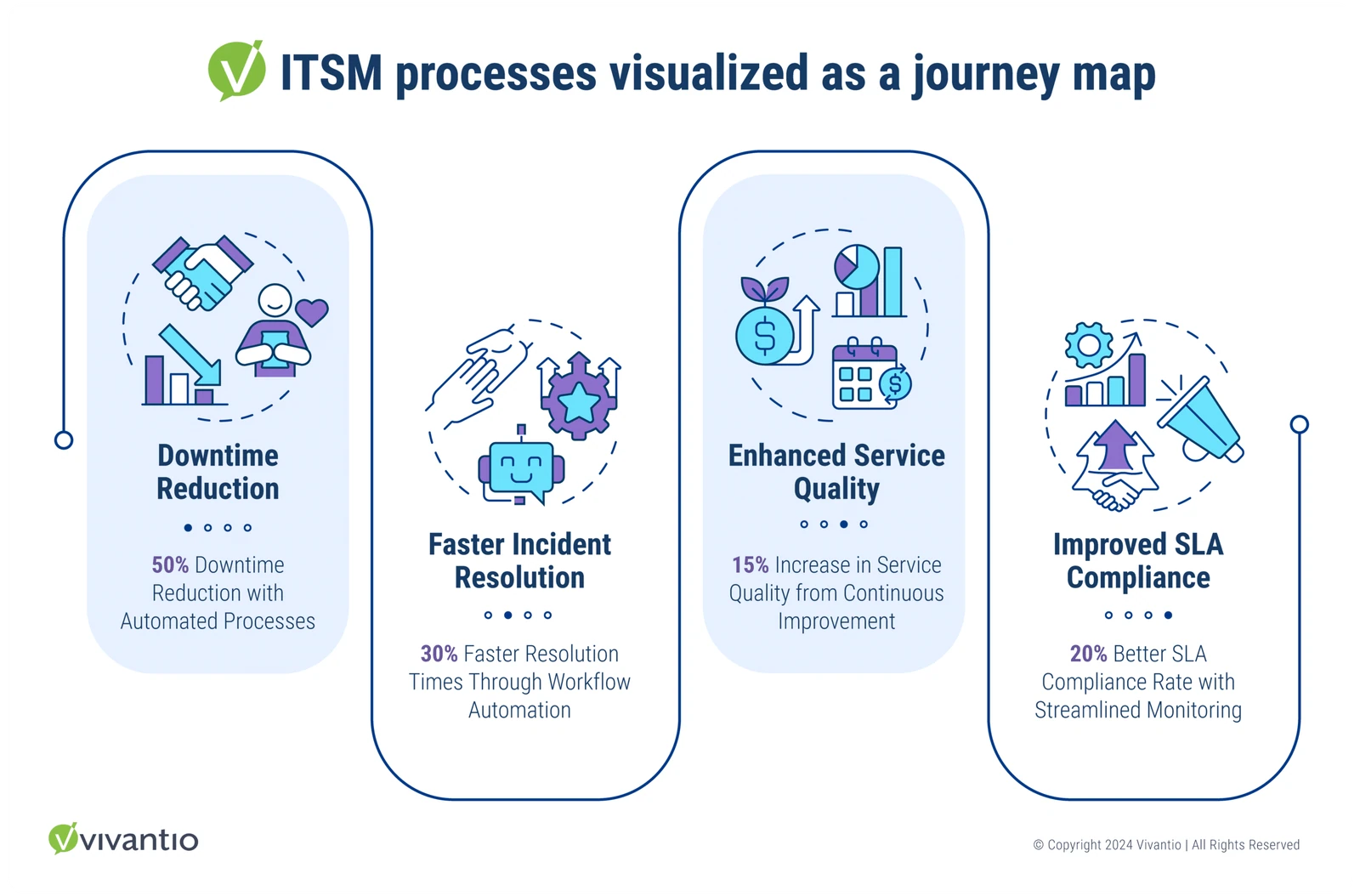
- Drive Continuous Improvement: Use insights from journey mapping tools to implement enhancements in service delivery, resulting in fewer disruptions and improved IT performance.
- Enhance Operational Efficiency: Improve communication, task automation, and issue resolution, allowing IT teams to focus on strategic goals.
Applying Customer Journey Mapping Tools to ITSM Scenarios
Customer journey mapping tools can be applied to a variety of ITSM scenarios, helping teams visualize processes and identify areas for optimization. Below, we explore key scenarios where these tools provide substantial benefits:
Scenario 1: Incident Management Lifecycle
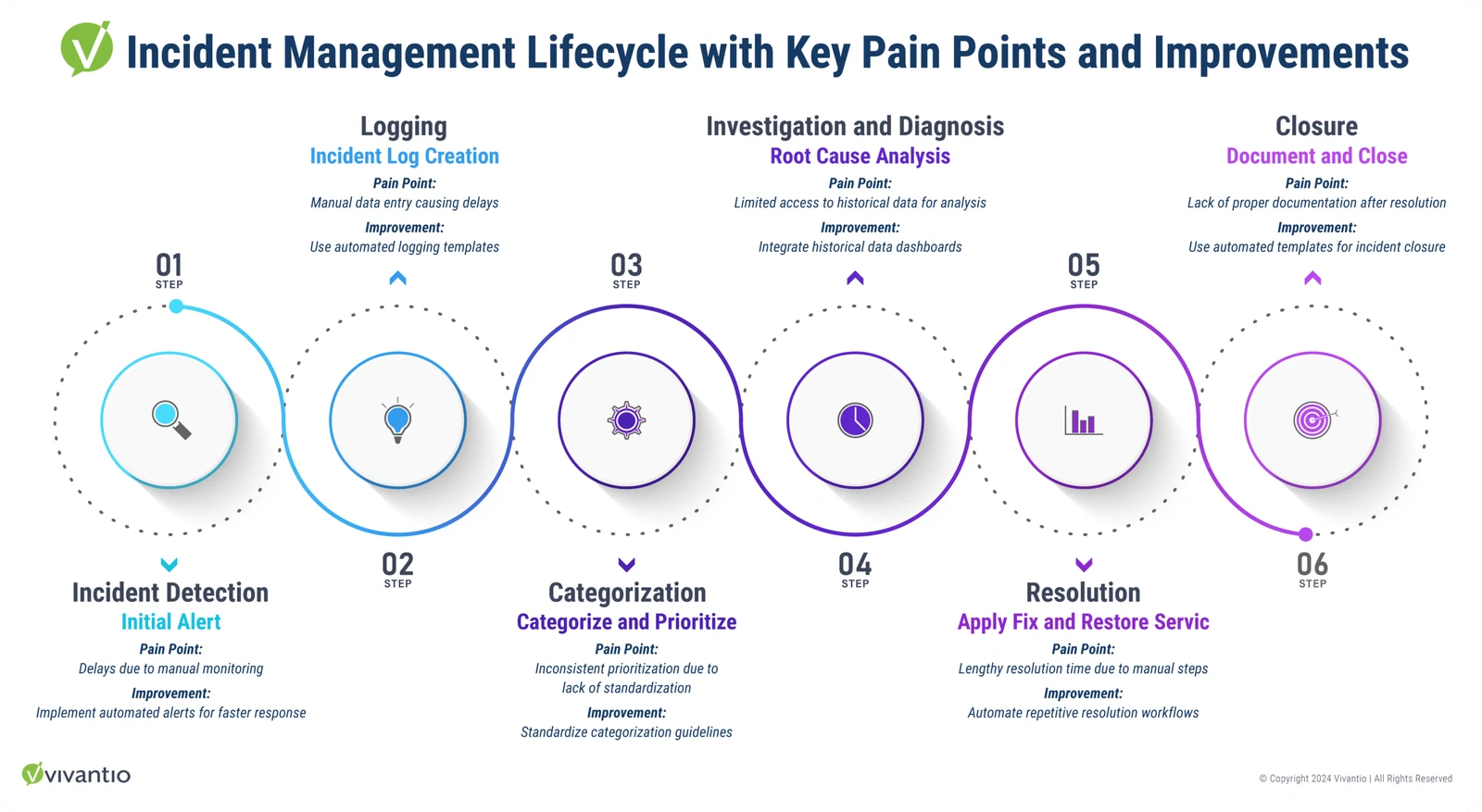
Summary: Incident management is a fundamental ITSM process that involves handling unexpected issues that impact service. Using customer journey mapping tools, IT teams can break down this lifecycle into clear stages, helping them to spot inefficiencies and speed up incident resolution.
-
Detection and Logging: Automatically log incidents and categorize them for immediate attention.
- Pain Point: Delays in logging incidents manually.
- Improvement: Automate incident logging using mapping tools with built-in templates.
-
Investigation and Diagnosis: Use historical data within the mapping tool to diagnose the root cause of incidents.
- Pain Point: Difficulty diagnosing without centralized historical data.
- Improvement: Integrate historical data for faster analysis and visualization.
Stat Insight: Organizations using automated customer journey mapping tools for incident management experienced a 50% reduction in mean time to resolution (MTTR). (bmc.com)
-
Resolution and Recovery: Resolve incidents and restore service in line with service-level agreements (SLAs).
- Pain Point: Slow recovery due to manual steps.
- Improvement: Automate resolution workflows for repetitive incidents.

Scenario 2: Change Management Process
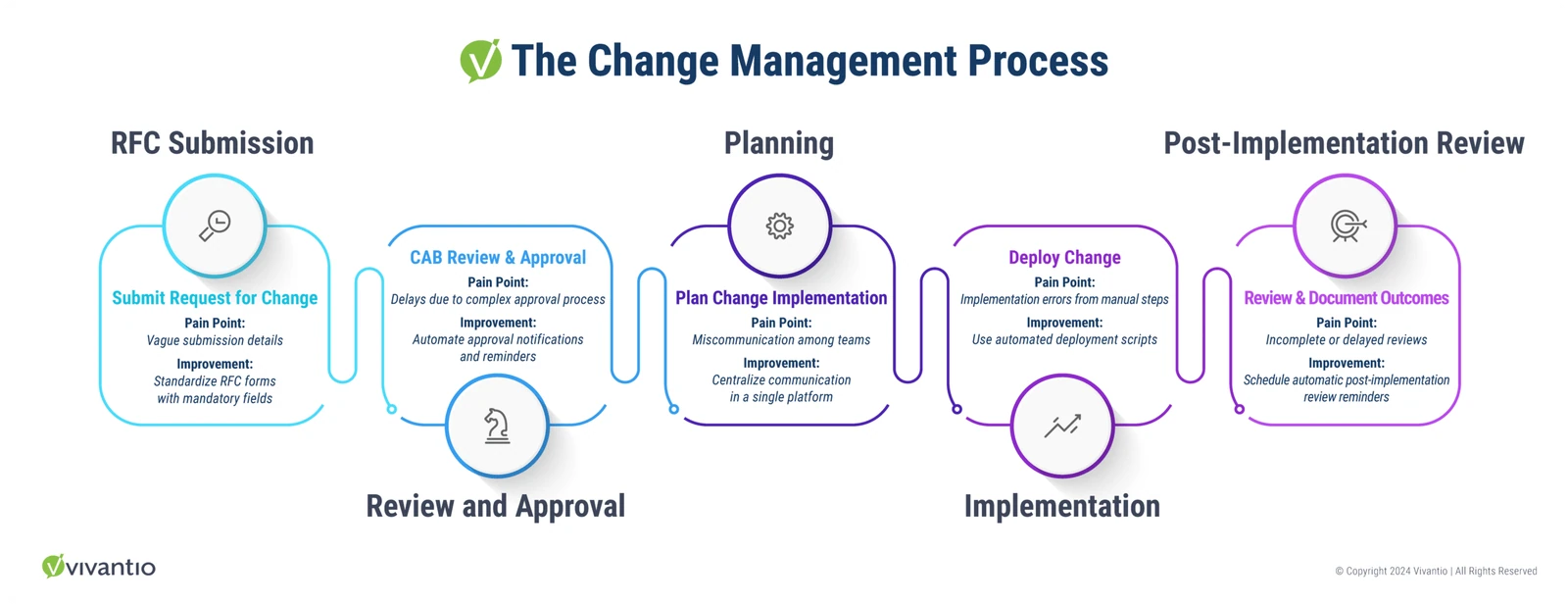
Summary: Change management involves implementing service modifications in a controlled manner to minimize disruptions. Customer journey mapping tools help visualize each step, ensuring that changes are planned, reviewed, and executed efficiently.
-
Request for Change (RFC) Submission: Standardize RFC submissions through mapping tools.
- Pain Point: Unclear or inconsistent change request submissions.
- Improvement: Use mapping tools to standardize RFC processes.
-
Approval and Implementation: Track and automate change approvals with mapping tools.
- Pain Point: Delays in approvals or miscommunications.
- Improvement: Use automated alerts and streamlined communication workflows.
Stat Insight: The Service Desk Institute reports that 68% of organizations with structured change management processes experienced fewer implementation delays. (servicedeskinstitute.com)
Scenario 3: IT Service Continuity Management
Summary: IT service continuity management ensures that services remain operational during major outages or disasters. Journey mapping tools offer a clear visualization of continuity plans, making it easier to identify gaps and improve response strategies.
-
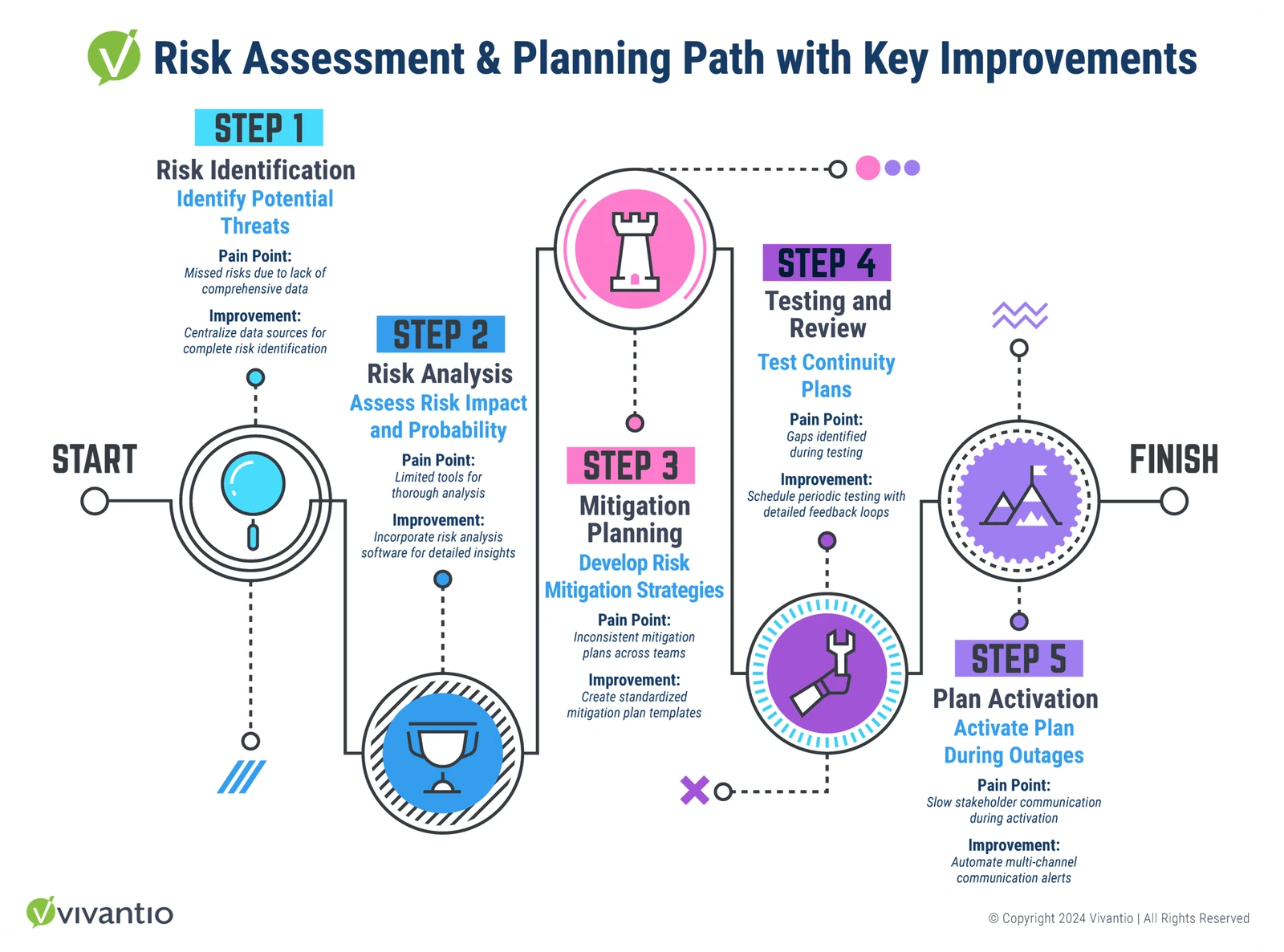
Risk Assessment and Planning: Identify risks to critical services and develop continuity plans.
- Pain Point: Incomplete risk assessments leading to gaps in continuity planning.
- Improvement: Centralize risk data to ensure comprehensive assessments.
-
Continuity Plan Activation: In the event of a disaster, follow predefined steps to restore services quickly.
- Pain Point: Delays in communication during disaster recovery.
- Improvement: Automate communication workflows to keep all stakeholders informed.
[Stat Insight]: Efficient communication during incidents can reduce downtime by up to 40%, according to a Uptime Institute study. (uptimeinstitute.com)
Mapping ITSM Scenarios to Achieve Continuous Improvement
Applying customer journey mapping tools helps IT teams visualize where inefficiencies occur and implement proactive improvements. This ensures alignment with ITIL best practices and enhances overall service delivery.
Key Processes to Map Using Customer Journey Mapping Tools:
- Problem Management: Visualize recurring incident patterns to find and fix root causes.
- Service Level Management (SLM): Use mapping tools to monitor SLA performance.
- Asset Management: Track asset lifecycles from procurement to decommissioning.
Industry Insight: A 2024 report from IDC highlights that organizations using advanced journey mapping tools saw a 20% improvement in service delivery. (idc.com)
Your Path to ITSM Excellence
Utilizing customer journey mapping tools in ITSM offers a unique perspective on day-to-day operations, enabling teams to visualize processes, address pain points, and implement continuous improvement strategies. By leveraging these techniques and aligning them with ITIL best practices, ITSM teams can transform their approach to service delivery, enhancing performance and satisfaction across the board.
Ready to enhance your ITSM strategy? Contact our solutions consultant team today or request a personalized demo to discover how Vivantio can empower your ITSM processes and drive operational success.
Read more
Browse all resources
Ready to see it?
See Vivantio in action
Step your team up to real service management, without the leap to enterprise. Get a walkthrough tailored to your workflows.