Workflow

Service delivery is a process. Vivantio makes it one.

Most teams run their service processes through a mix of emails, spreadsheets and team knowledge. It works, until someone's off sick, a new agent joins, or a request falls through a gap. Vivantio's workflow builder lets your admin team design how work moves through your service operation, and enforce it every time.

Configured by your admin team. No developer or vendor engagement required.

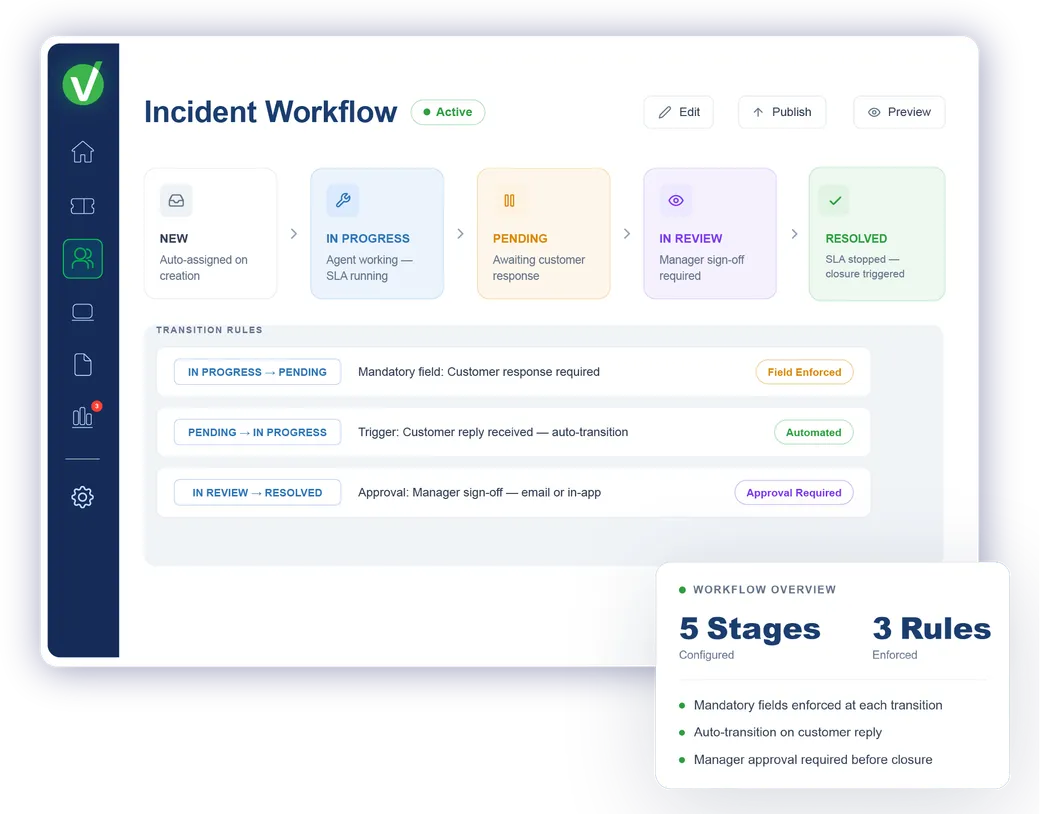
Vivantio workflow — visual workflow builder with stages and transitions

Service teams at leading organizations trust Vivantio

The problem it solves

Informal processes break when the person who knows them leaves.

When process knowledge lives in people's heads, it doesn't survive a team change, a holiday or a headcount reduction.

Without defined workflows

New agent asks a senior colleague how to handle a complex request

Emergency change skips a required approval: nobody realises until after deployment

Audit asks for the change approval log: it exists in someone's inbox, not the system

Two agents handle the same request type differently, producing inconsistent outcomes

With Vivantio workflows

Every process step defined in the platform: new agents follow, not improvise

Multi-step approvals enforced by the workflow: progress blocked until sign-off received

Every approval, action and status change recorded automatically in the ticket

Same request type handled the same way, every time, regardless of who picks it up

How Vivantio workflow works

Every stage defined. Every handoff automated.

Lifecycle stage configuration

Define exactly how work moves through your operation

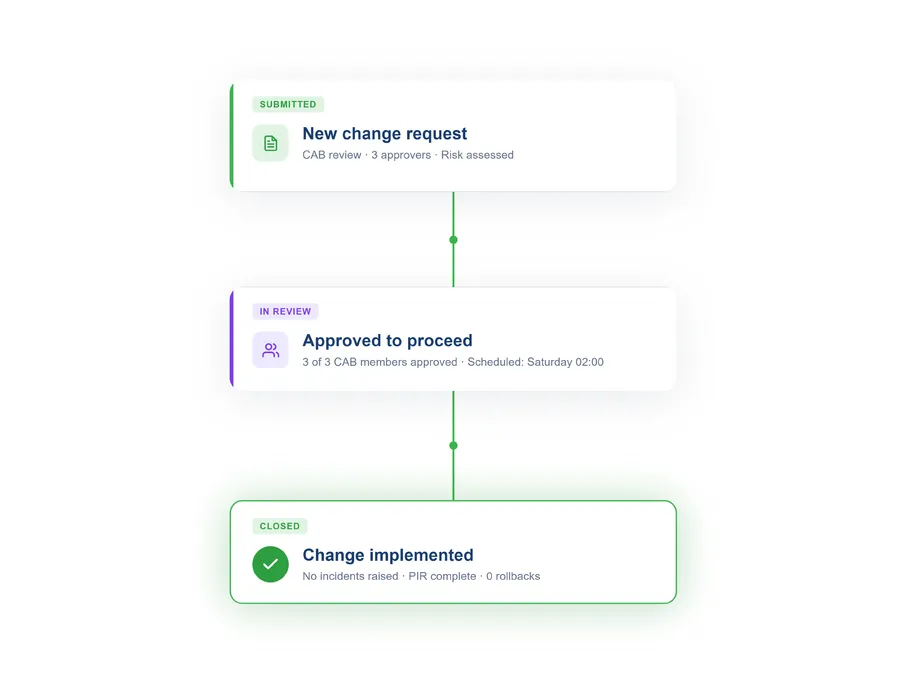
Every ticket type in Vivantio has its own configurable lifecycle — the stages, transitions and status labels that reflect how your team actually works. Stages are administrator-defined: you decide what "In Review", "Pending Customer" or "Awaiting Approval" means for each process, and what transitions are allowed between them. Workflow stages are displayed in a clear visual flow so agents always know where a ticket is in its lifecycle.

  • Distinct workflows per ticket type — incidents, changes and requests each follow their own path
  • Configurable status labels to match your terminology, not a generic template
  • Mandatory fields enforced at transitions — agents can't move a ticket forward without required data
See how ITIL processes are structured in Vivantio
Vivantio workflow — configurable ticket lifecycle stages and transitions
Conditional routing and assignment

The right ticket goes to the right team — automatically

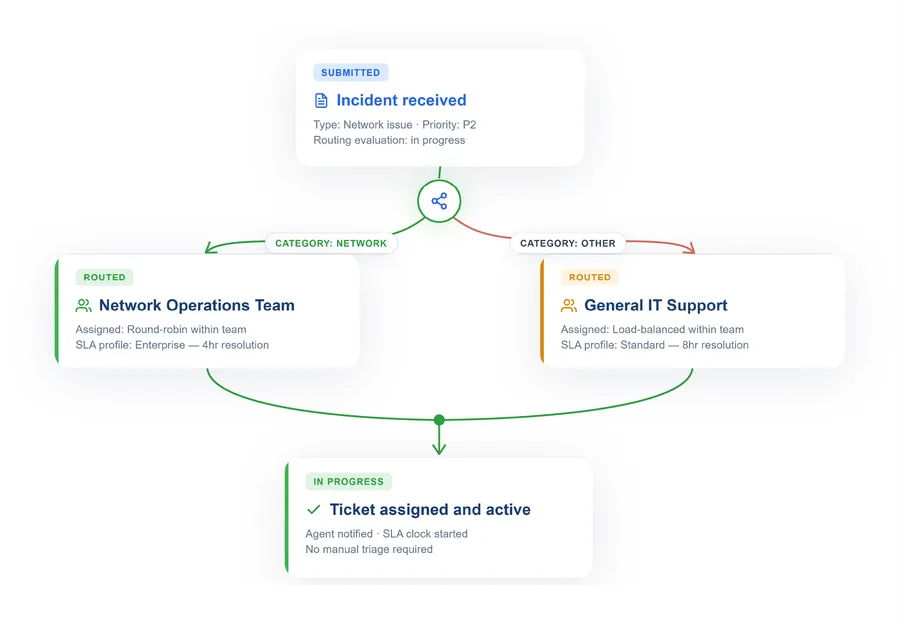
Vivantio routes tickets based on the values in the form: ticket type, category, priority, affected system, customer type or any custom field. Routing rules evaluate these conditions and assign the ticket to the correct queue, team or individual without manual intervention. For complex service requests that span multiple teams, work can be split into parallel tracks that each team fulfils independently.

  • Routing on any field — type, category, priority, customer, custom attributes
  • Round-robin, load-balanced or skills-based assignment within teams
  • Parallel tracks for multi-department fulfilment
See how automation powers workflow routing
Vivantio workflow — conditional routing rules and team assignment
Approvals within the workflow

Approval steps that hold the process — not the team

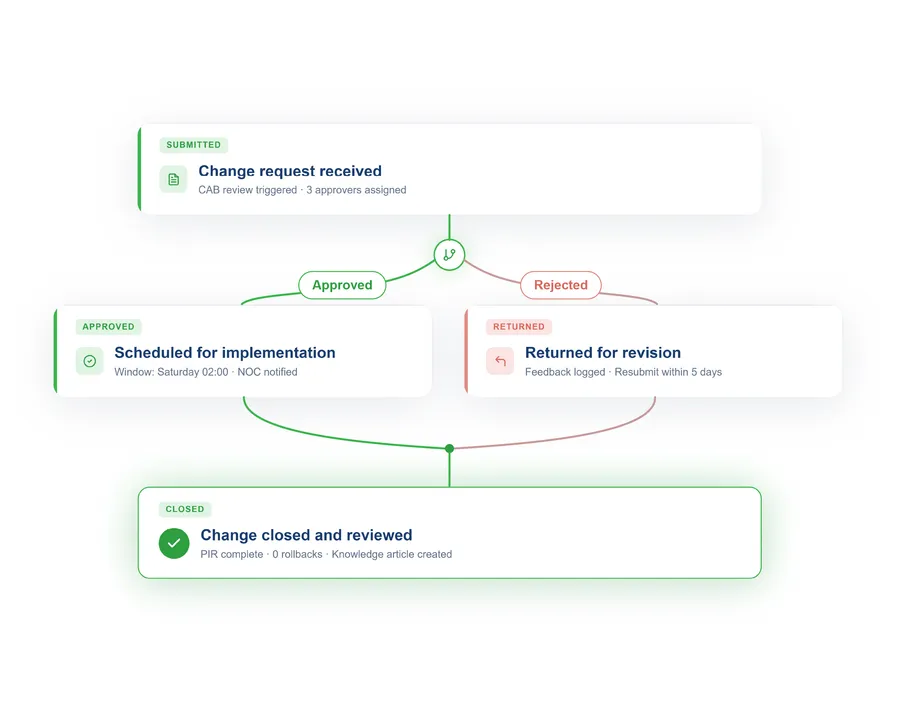
Vivantio approval workflows sit within any stage of the service lifecycle. Sequential, parallel and role-based approval chains are all supported. Each step has a configurable time limit — if an approver doesn't respond within the window, the step auto-escalates to a backup approver or supervisor. Approvals are accessible from the agent workspace and by email, so external stakeholders don't need a Vivantio account to participate in the process.

  • Sequential, parallel and conditional approval paths in any workflow stage
  • Time-limited approval steps with automatic escalation on timeout
  • Email-based approval for stakeholders who don't have agent access
See how service catalogue requests trigger workflows
Vivantio workflow — approval chain with sequential and parallel steps
Recognised by the teams who rely on Vivantio workflows every day
G2 Leader — United Kingdom Service DeskG2 Leader — Enterprise Service DeskG2 Leader — Mid-Market Complaint ManagementG2 Leader — HR Service DeliveryG2 Leader — Mid-Market IT Asset ManagementG2 Leader — Mid-Market ITSMG2 Leader — IT Service Management
Common questions

Workflow: what teams ask us

What is workflow management in ITSM?

Workflow management in ITSM is the ability to define, deploy and track the exact sequence of steps a ticket or request must follow from open to resolved. A workflow specifies who does what, in which order, with what approvals, and what happens at each transition. Vivantio allows admin teams to configure multi-stage workflows — including conditional branching, approval chains and parallel tracks — without requiring developer involvement.

What is the difference between a workflow and automation in Vivantio?

Workflows define the lifecycle stages and transitions a ticket moves through — the structure of how work progresses. Automation handles what happens at each point in that journey: routing the ticket, sending a notification, triggering a task or escalating to a supervisor. In Vivantio, workflows and automation work together: the workflow defines the path, and automation handles the handoffs.

Can workflows include approval steps in Vivantio?

Yes. Vivantio supports approval gates within any workflow stage. Approval steps can be sequential (one approver at a time) or parallel (multiple approvers simultaneously). Each step has a configurable time limit — if an approver does not respond within the defined window, the step escalates automatically. Approvers can respond via the agent workspace or email.

Can different ticket types have different workflows?

Yes. Vivantio assigns workflows at the ticket type level — so incidents, service requests, change requests and problems each follow their own lifecycle. Within a ticket type, the workflow can further vary based on priority, category or other attributes. A P1 incident can follow a different escalation path to a P4, and a standard change can have a lighter approval requirement than an emergency change.

See it in action

Consistent service delivery. Every time.

We'll show you how Vivantio's workflow builder maps to your current processes — and what it takes to configure the first workflow your team will actually use.

~30-minute demo No commitment Built around your process